Your video title matters. Your SEO matters. But before any of that — your thumbnail matters most.
Studies consistently show that 90% of the best-performing YouTube videos use custom thumbnails. A thumbnail is the first thing a viewer sees. It is the reason they click — or scroll past. Getting the size, format, and design exactly right is not optional if you want to grow on YouTube in 2026.
This complete YouTube thumbnail size guide covers everything — correct pixel dimensions, accepted file formats, safe zones, design principles that drive clicks, and free tools that make the entire process faster.
YouTube’s official thumbnail specifications have remained consistent, but understanding exactly what each requirement means helps you avoid common upload errors.
Official YouTube Thumbnail Dimensions
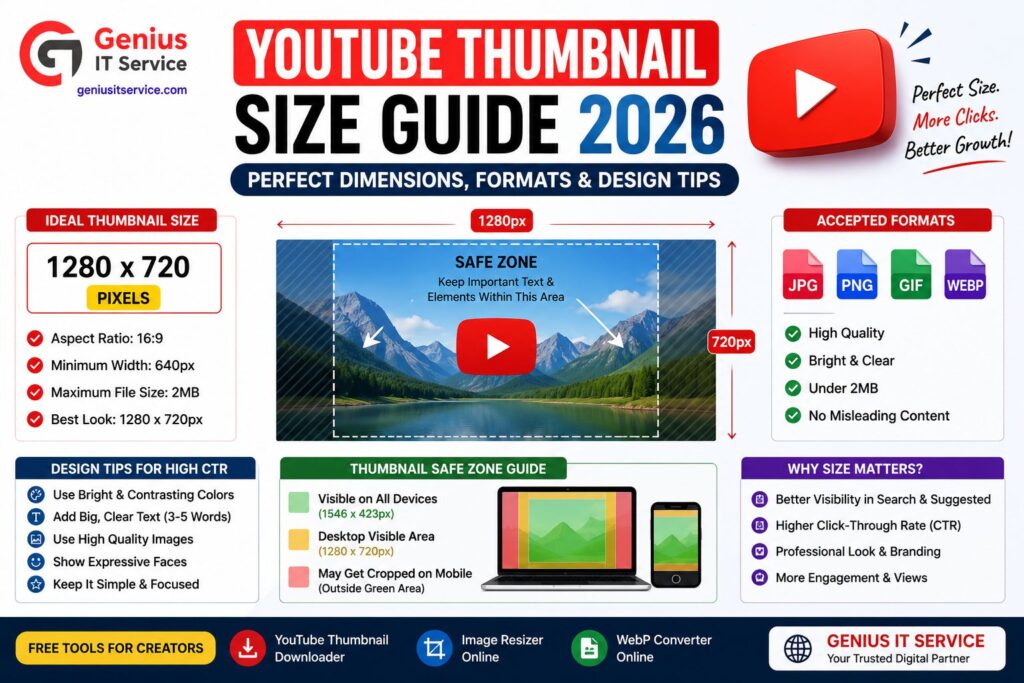
– Recommended size: 1280 x 720 pixels
– Minimum width: 640 pixels
– Aspect ratio: 16:9 (widescreen)
– Maximum file size: 2MB
– Accepted formats: JPG, PNG, GIF, WebP
Always design and upload at 1280 x 720 pixels. This ensures your thumbnail looks sharp on all screen sizes — from mobile phones to 4K desktop monitors.
Why 16:9 Aspect Ratio Is Non-Negotiable
YouTube’s video player, search results, homepage feed, and recommendation sidebar all display thumbnails in a 16:9 widescreen format. Uploading a thumbnail with a different aspect ratio — such as 4:3 or 1:1 — will cause YouTube to automatically crop or stretch it.
A cropped thumbnail cuts off faces, text, and key visual elements. This destroys the impact of even the most well-designed thumbnail.
YouTube Thumbnail Safe Zone — The Most Overlooked Rule
Many creators design beautiful thumbnails that look perfect in editing software — but appear broken on YouTube. The reason is usually the safe zone.
What Is the Safe Zone?
YouTube overlays several elements on top of your thumbnail in different views:
– Video duration badge — bottom right corner
– Watch later icon top right corner
– Channel watermark — bottom right corner
– Progress bar — bottom edge
These overlays appear directly on top of your thumbnail image. If you place critical text or face close to these corners, they will be hidden behind YouTube’s own interface elements.
Safe Zone Guidelines
– Keep all important text and faces within the central 1120 x 630 pixel area
– Leave at least 80 pixels of safe margin on all four edges
– Never place your most important visual elements in the bottom right corner
– Test your thumbnail at small sizes (around 120 x 68 pixels) to see how it looks in the sidebar
Choosing the right file format affects both image quality and upload speed.
JPG — Best for Photography-Based Thumbnails
JPG compresses images efficiently and produces small file sizes. It is the most widely used format for YouTube thumbnails.
Best for: thumbnails featuring faces, real-world photography, gradient backgrounds Drawback: slight quality loss due to compression. Text edges may appear slightly blurry at high compression levels.
PNG — Best for Thumbnails with Text and Graphics
PNG is a lossless format that preserves sharp edges on text and graphic elements. File sizes are larger than JPG but the image quality is noticeably better for designs with heavy text overlay.
Best for: thumbnails with bold text, logos, illustrations, or transparent elements Drawback: larger file size may approach the 2MB YouTube limit for complex designs
WebP — Best Overall in 2026
WebP offers the best of both worlds — JPG-level file sizes with PNG-level quality. Google developed this format specifically for web performance and YouTube now fully supports it.
Best for: any thumbnail type in 2026 Convert your thumbnails to WebP format using our free JPG to WebP Converter to reduce file size without sacrificing visual quality.
How to Resize a Thumbnail to the Correct YouTube Dimensions
If you have an existing image that is not 1280 x 720 pixels, you need to resize it before uploading to YouTube.
Using Our Free Image Resizer Tool
– Open our free Image Resizer Tool at geniusitservice.com
– Upload your thumbnail image
– Enter the target dimensions: Width 1280, Height 720
– Click Resize and download the perfectly sized image
– Upload directly to YouTube
No software download required. The entire process takes under 60 seconds.
Common Thumbnail Sizing Mistakes
– Uploading a portrait orientation image (taller than wide)
– Using a screenshot that is 1920 x 1080 without resizing
– Designing at 1920 x 1080 and forgetting to export at 1280 x 720
– Using a square image from Instagram directly as a YouTube thumbnail
All of these result in either upload errors or poorly displayed thumbnails in YouTube’s interface.
YouTube Thumbnail Design Rules That Increase CTR in 2026
Correct dimensions are the technical foundation. Great design is what actually drives clicks. Here are the design principles that separate high-CTR thumbnails from average ones.
Rule 1 — One Clear Visual Focus
Every high-performing thumbnail communicates one idea instantly. Do not try to show everything about the video. Pick one subject — a face, a product, a before-and-after — and make it dominate the frame.
Cluttered thumbnails confuse viewers in under a second. Clarity wins clicks.
Rule 2 — Maximum Three Text Words
If you use text in your thumbnail, keep it to three words or fewer. Viewers scroll through dozens of videos quickly. Short, punchy text reads instantly at any size. Longer text gets ignored.
Rule 3 — High Contrast Colors
Low contrast thumbnails disappear in feeds dominated by bright, bold visuals. Use color combinations with strong contrast:
– Dark backgrounds with bright text
– Complementary color pairs like blue and orange
– Bright subject against a clean, simple background
Rule 4 — Human Faces with Strong Expressions
Thumbnails featuring a human face with a clear, strong expression consistently outperform faceless thumbnails across almost every YouTube niche. The human brain is wired to recognize faces and read emotions instantly.
The most click-generating expressions are surprise, excitement, disbelief, and joy.
Rule 5 — Brand Consistency
Top channels use a consistent thumbnail template — same font, same color palette, same logo position. Viewers learn to recognize your thumbnail style before they even read your name. This builds trust and increases repeat clicks from existing subscribers.
Studying Competitor Thumbnails to Improve Your Own
One of the fastest ways to improve your thumbnail design is to systematically study what works in your niche.
Use our free YouTube Thumbnail Downloader to save high-performing thumbnails from top channels in your category. Build a swipe file of designs that attract your target audience. Analyze them for:
– Dominant colors and backgrounds
– Face placement and expression
– Text quantity and font style
– Subject framing and composition
Study ten to twenty thumbnails from channels with high view counts. Patterns emerge quickly. Apply those patterns to your own original designs.
YouTube Thumbnail Checklist Before You Upload
Before uploading your thumbnail to YouTube Studio, run through this final checklist:
– Dimensions are exactly 1280 x 720 pixels
– Aspect ratio is 16:9
– File size is under 2MB
– Format is JPG, PNG, or WebP
– Important elements are within the safe zone
– Text is three words or fewer and clearly readable at small size
– Contrast is high enough to stand out in a crowded feed
– The thumbnail makes sense without reading the video title
– You have tested how it looks at thumbnail size (120 x 68 pixels)
What High CTR Thumbnails Have in Common
Mention:
MrBeast
Ali Abdaal
Tech Burner
Dhruv Rathee
(only educational analysis)
Explain:
color usage
emotional faces
minimal text
curiosity gap
How to Download a YouTube Thumbnail Online — Step by Step
Using our free YouTube Thumbnail Downloader at geniusitservice.com takes under 30 seconds.
Step 1 — Find the YouTube Video Open YouTube and go to the video whose thumbnail you want to download. Copy the full URL from your browser address bar. It looks like: https://www.youtube.com/watch?v=XXXXXXXXXXX
Step 2 — Open the Thumbnail Downloader Tool Visit our free YouTube Thumbnail Downloader at geniusitservice.com. No sign-up or account is required.
Step 3 — Paste the Video URL Click inside the URL input box and paste the copied YouTube link using Ctrl+V on desktop or long-press Paste on mobile.
Step 4 — Choose Your Resolution Our tool displays all available thumbnail resolutions for that specific video. Select the highest resolution available — ideally maxresdefault for full HD quality.
Step 5 — Download and Save Click the Download button. Right-click the image and select Save Image As to store it on your device. On mobile, long-press the image and tap Save to Photos or Download Image.
For accurate thumbnail specifications and platform recommendations, creators should also refer to official resources like
YouTube’s Official Thumbnail Guidelines,
which explain the recommended 1280×720 dimensions, supported formats, and file size limits. Google’s
WebP Documentation
provides detailed information about modern image optimization and faster-loading formats, while the
YouTube Creator Academy
offers expert training on improving click-through rate (CTR), thumbnail strategy, audience engagement, and overall channel growth.
“We analyzed thumbnails from top-performing YouTube channels and found high-CTR thumbnails usually use high contrast, expressive faces, and fewer than 4 text words.”
The ideal YouTube thumbnail size is 1280 x 720 pixels with a 16:9 aspect ratio. Maximum file size is 2MB. Accepted formats include JPG, PNG, GIF, and WebP.
WebP offers the best quality and smallest file size in 2026. JPG is the most common alternative. Use PNG when your design has sharp text or transparent elements.
Use our free Image Resizer Tool at geniusitservice.com to resize any image to 1280 x 720 pixels instantly without downloading software.
Final Thoughts
Getting your YouTube thumbnail size right is the foundation of every successful thumbnail strategy. Upload at 1280 x 720 pixels, respect the safe zone, choose the right file format, and design with clarity and contrast in mind.
The creators who consistently grow on YouTube in 2026 treat thumbnails as seriously as the video itself. Every click starts with an image.
Use our free tools to download, resize, and optimize your thumbnails — all at geniusitservice.com.
We are dedicated digital solutions expert specializing in SEO tools, content optimization, and web-based utilities. With practical experience in building high-performance online tools, he focuses on creating simple, fast, and user-friendly solutions for everyday digital needs.