Character Counter Online Free — Count Characters Instantly for SEO, Social Media & More (2026)
Character Counter Online Free — Count Characters Instantly for SEO, Social Media & More (2026)
Count Characters for SEO & Social Media
Every platform has a character limit. Twitter allows 280. Google truncates meta descriptions beyond 160. Instagram shows only the first 125 characters before cutting off. SMS messages split at 160 characters.
If you are a writer, marketer, or content creator, you already know the frustration of crafting the perfect message — only to find it is too long or too short. That is exactly why a character counter online free tool is an essential part of your daily workflow.
In this complete guide, you will learn why character count matters, what limits apply to every major platform, and how to use our free tool to stay within limits every single time.
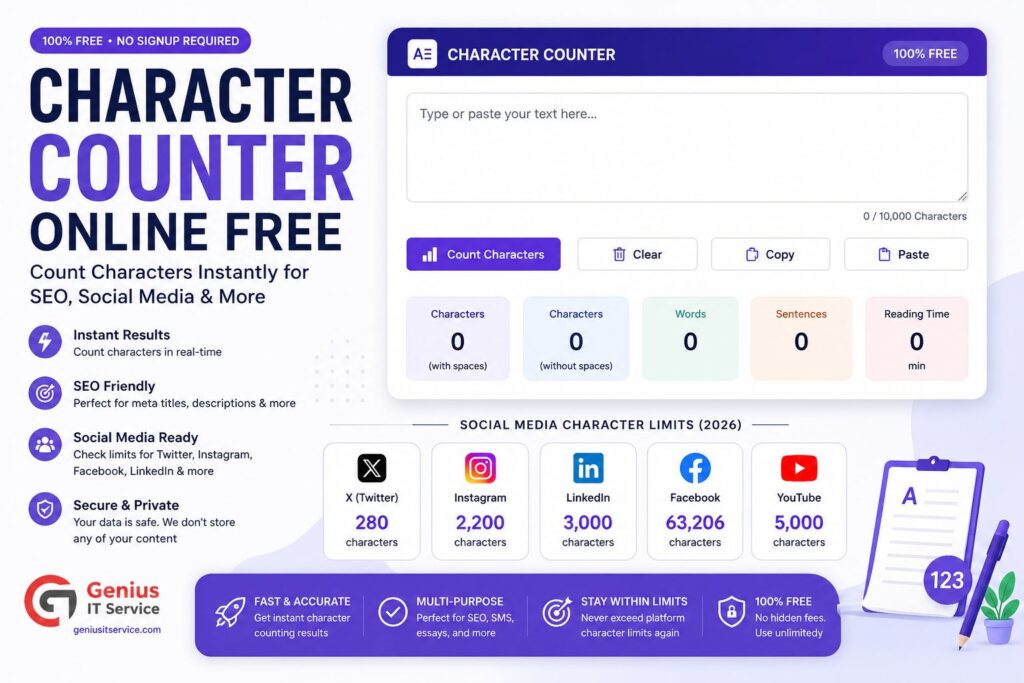
A character counter online free tool is a web-based application that analyzes your text in real time and tells you:
– Total characters with spaces – Total characters without spaces – Total word count – Number of sentences and paragraphs – Estimated reading time
Unlike Microsoft Word, which requires you to open a separate dialog box to see character count, our tool displays everything automatically the moment you start typing or pasting text. No downloads, no sign-up, completely free.
Search engines like Google display only a limited number of characters in their search results. If your title tag or meta description is too long, Google will truncate it, cutting off your message mid-sentence. This lowers your click-through rate (CTR) and ultimately hurts your traffic.
– Title tags: ideal length is 50 to 60 characters – Meta descriptions: ideal length is 150 to 160 characters – URL slugs: keep under 75 characters for best results
Use our Meta Tag Generator alongside the character counter to create perfectly optimized title tags and descriptions every time.
Character Count and Social Media Reach
Every social platform has different character rules. Going over the limit means your content gets cut off or rejected entirely. Going significantly under the limit often means you are not providing enough context to drive engagement.
Knowing your exact character count before posting is the difference between a professional content strategy and a guessing game.
Tip: Keep tweets between 71 and 100 characters for maximum retweet rate, according to engagement research.
Instagram
– Caption: 2,200 characters maximum
– Visible before “more” button: 125 characters
– Bio: 150 characters
– Username: 30 characters
– Hashtags: each hashtag counts toward your character limit
Tip: Put your most important message or call to action in the first 125 characters so it is visible without clicking.
LinkedIn
– Post update: 3,000 characters
– Article: 110,000 characters
– Headline: 220 characters
– Summary/About: 2,000 characters
– Connection request message: 300 characters
Facebook
– Post: 63,206 characters (keep under 400 for best organic reach)
– Page description: 255 characters
– Ad headline: 40 characters
– Ad primary text: 125 characters (before truncation)
YouTube
– Video title: 100 characters (keep under 70 to avoid truncation)
– Description: 5,000 characters
– Tags: 500 characters total
– Channel description: 1,000 characters
SMS and WhatsApp
– Standard SMS: 160 characters per message
– Messages over 160 characters are split into multiple SMS and charged separately
– WhatsApp messages: no strict limit, but shorter messages get faster replies
Character Count for SEO — The Complete Guide
Title Tag Character Limit
Your page title is the single most important SEO element on any page. Google displays approximately 50 to 60 characters of your title tag in search results. Titles longer than 60 characters get truncated with an ellipsis, which makes them less clickable.
Best practice for title tags:
– Keep between 50 and 60 characters
– Include your focus keyword near the beginning
– Add your brand name at the end
– Make it compelling and descriptive
Meta Description Character Limit
Meta descriptions do not directly affect rankings, but they have a massive impact on your click-through rate. Google shows approximately 150 to 160 characters of your meta description. Going beyond 160 characters means Google cuts off your description, often mid-sentence.
Best practice for meta descriptions:
– Keep between 150 and 160 characters
– Include your focus keyword naturally
– Add a clear call to action
– Make it sound helpful and relevant
Use our Meta Tag Generator tool to create optimized meta tags and then check the character count with our free tool to ensure they fit perfectly.
URL Slug Character Limit
Short, descriptive URLs rank better and get more clicks. Google recommends keeping URL slugs simple and relevant. Ideal URL slugs are:
– Between 3 and 5 words
– Under 75 characters total
– Hyphenated, not underscored
– Lowercase only
How to Use Our Character Counter Tool — Step by Step
Step 2 — Paste or Type Your Text Click inside the input box and paste your content using Ctrl+V or type directly. The tool works in real time.
Step 3 — Read Your Character Count The tool instantly shows you characters with spaces, characters without spaces, word count, and reading time.
Step 4 — Adjust Until You Hit the Right Length Edit your text until you reach the ideal character count for your target platform. The counter updates live as you type.
Character Counter vs. Built-in Platform Tools
Many platforms show a character countdown as you type, but they only work inside that platform. Our free character counter online tool lets you:
– Draft your content offline before posting
– Check multiple drafts side by side
– Use it for any platform — not just one
– Copy and paste the final, perfectly sized text
This is especially useful for marketers and agencies managing content across multiple platforms simultaneously.
Other Free Tools to Supercharge Your Content
While you are optimizing your character count, these free tools from Genius IT Service will help you create better content across the board:
– Word Counter Tool — Count words, check keyword density and reading time
– Meta Tag Generator — Build SEO-optimized title tags and meta descriptions
– Case Converter Tool — Switch between uppercase, lowercase, title case instantly
– AI Content Detector — Check if your writing appears AI-generated before publishing
Characters with spaces include every space between words. Characters without spaces count only letters, numbers, and punctuation. Some platforms count spaces toward the limit while others do not.
Yes. Our free tool works perfectly for Instagram captions. Keep your opening sentence under 125 characters so it is visible before the read more button.
Final Thoughts
Whether you are writing a tweet, a meta description, an SMS campaign, or a LinkedIn post, staying within character limits is not optional — it is professional. A character counter online free tool removes all the guesswork and lets you focus on what actually matters: writing great content.
Our free character counter at Genius IT Service is fast, accurate, and available on any device with no sign-up required. Use it every time you create content and watch your engagement, SEO, and click-through rates improve.
We are dedicated digital solutions expert specializing in SEO tools, content optimization, and web-based utilities. With practical experience in building high-performance online tools, he focuses on creating simple, fast, and user-friendly solutions for everyday digital needs.