How to Make YouTube Thumbnail That Gets Clicks — Complete Guide for 2026
How to Make YouTube Thumbnail That Gets Clicks — Complete Guide for 2026
YouTube Thumbnail That Gets Clicks
The average YouTube viewer decides whether to click a video in less than two seconds. In that window, your thumbnail does all the selling.
A weak thumbnail means your video gets ignored — regardless of how good the content is. A strong thumbnail can take an average video and make it go viral. In 2026, with over 500 hours of video uploaded to YouTube every minute, the competition for attention has never been greater.
This complete guide teaches you exactly how to make a YouTube thumbnail from scratch — covering tools, design principles, psychology of clicks, common mistakes, and a step-by-step process you can follow today.
Why Your YouTube Thumbnail Is More Important Than Your Title
YouTube’s own internal research shows that thumbnails influence a viewer’s decision to click more than any other factor — including the video title, view count, or channel name.
Here is why:
– Your thumbnail appears before the viewer reads your title
– On mobile (which accounts for over 70% of YouTube watch time), thumbnails dominate the screen
– YouTube’s recommendation algorithm rewards high CTR videos with more impressions
– A 1% improvement in CTR can result in thousands of additional monthly views
The bottom line: learning how to make a great YouTube thumbnail is one of the highest ROI skills a content creator can develop.
Before opening any design tool, make sure you have these elements ready.
A Clear Video Concept
Your thumbnail should represent one core idea from the video — not everything in it. Ask yourself: what is the single most compelling moment or outcome in this video? That is what your thumbnail should show.
A High-Quality Photo or Graphic
For face-forward thumbnails, you need a sharp, well-lit photo of yourself or your subject. Poor lighting or blurry images make even great designs look unprofessional.
Your Brand Colors and Font
Decide on two to three brand colors and one or two fonts you will use consistently across all thumbnails. Consistency builds channel recognition over time.
Competitor Research
Before designing, spend ten minutes studying top thumbnails in your niche. Use our free YouTube Thumbnail Downloader to save thumbnails from high-performing channels and identify the patterns that work in your category.
Best Free Tools to Make YouTube Thumbnails in 2026
You do not need expensive software to create professional thumbnails. These free tools produce excellent results.
Canva — Best for Beginners
Canva offers hundreds of pre-built YouTube thumbnail templates at the correct 1280 x 720 pixel dimensions. The drag-and-drop interface requires zero design experience.
Best features:
– Ready-made thumbnail templates
– Built-in stock photo library
– One-click background removal
– Free plan covers all basic thumbnail needs
Adobe Express — Best for Branding
Adobe Express (formerly Adobe Spark) offers more advanced branding controls than Canva. It includes a logo maker, brand kit, and animation features for creators who want a more polished look.
Photopea — Best Free Photoshop Alternative
Photopea runs in your browser and mimics Photoshop’s interface almost exactly. It supports PSD files, layer masks, and advanced photo editing — all for free.
Best for: creators who already know Photoshop and want the same power without the subscription cost.
Remove.bg — Best for Background Removal
A common technique in high-CTR thumbnails is placing the creator against a solid color or custom background. Remove.bg removes backgrounds from photos in one click for free.
How to Make a YouTube Thumbnail — Step by Step
Follow this exact process for every thumbnail you create.
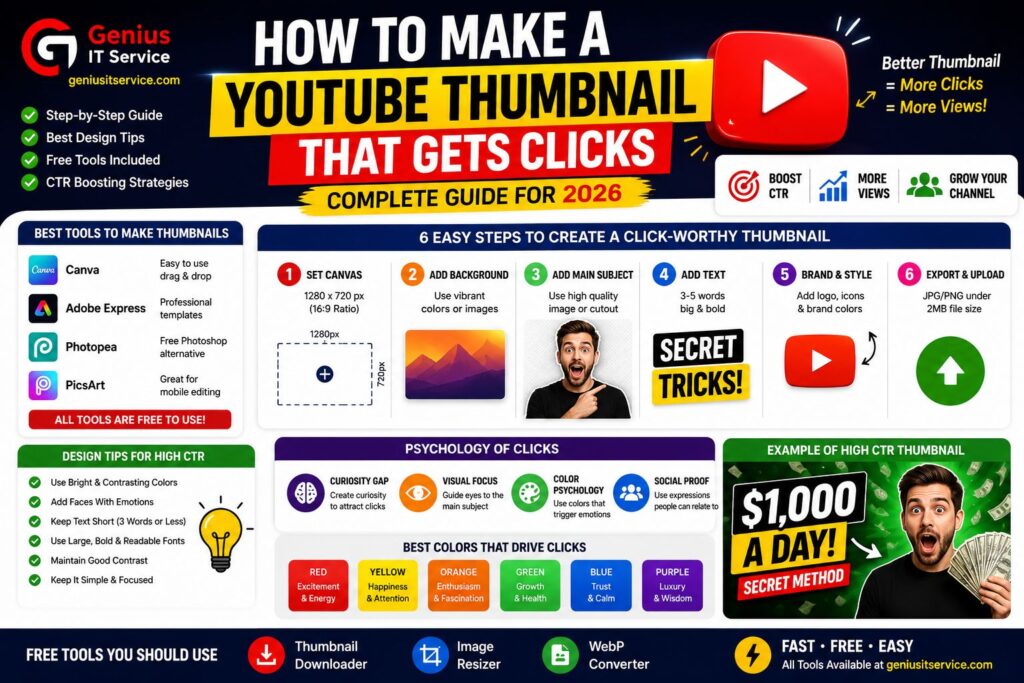
Step 1 — Set Up Your Canvas at the Correct Size Open your chosen design tool and create a new project. Set the dimensions to exactly 1280 pixels wide and 720 pixels tall. This is YouTube’s recommended thumbnail size for 2026.
If you have an existing image that needs resizing to these dimensions, use our free Image Resizer Tool at geniusitservice.com to resize it perfectly without distortion.
Step 2 — Choose Your Background Your background sets the mood and provides contrast for foreground elements. Three approaches work well:
– Solid color — clean, bold, and brand-consistent
– Blurred photo — professional and visually rich
– Graphic or pattern — high energy and eye-catching
Make sure your background does not compete with your main subject. It should support, not distract.
Step 3 — Place Your Main Subject Your main subject should occupy 60% to 80% of the thumbnail frame. Whether it is a face, a product, a comparison chart, or a screenshot — make it large and dominant.
If using a photo, remove the background using Remove.bg and place yourself against your chosen background for a professional composite effect.
Step 4 — Add Text Overlay (Three Words Maximum) Text on thumbnails works best when it is:
– Bold, thick font with high contrast
– Three words or fewer
– Large enough to read at sidebar size (approximately 120 x 68 pixels)
– Positioned away from the bottom right corner (where YouTube overlays duration)
Add a subtle shadow or outline to ensure readability against any background.
Step 5 — Apply Your Brand Colors Replace any generic template colors with your brand palette. Keep it to two or three colors maximum. More colors create visual chaos and reduce impact.
Step 6 — Test at Thumbnail Size Before exporting, zoom out dramatically and view your thumbnail at a small size. Ask: can I understand what this video is about in under two seconds at this size?
If the answer is no, simplify. Remove one element. Make the text bigger. Increase contrast.
Step 7 — Export and Optimize Export your thumbnail as JPG for photo-heavy designs or PNG for graphic-heavy designs. For the best file size and quality balance in 2026, convert your image to WebP format using our free JPG to WebP Converter before uploading.
Keep the file under 2MB. YouTube rejects thumbnails larger than this.
Step 8 — Upload to YouTube Studio Open YouTube Studio, go to Content, select your video, scroll to the Thumbnail section, and upload your custom image. YouTube displays the new thumbnail within minutes.
Understanding why viewers click reveals what to design into every thumbnail.
Curiosity Gap
Thumbnails that imply a question without answering it drive higher CTR. Showing a surprised face next to a product creates a question in the viewer’s mind that only clicking can answer.
Social Proof Signals
Numbers in thumbnails increase credibility. Thumbnails showing a large crowd, many products, or a statistic like 10 Million subtly signal that the content is popular and worth watching.
Visual Contrast and Pattern Interruption
Human eyes are drawn to things that break the pattern of their environment. A bright yellow thumbnail in a feed of dark-toned videos will attract attention automatically. Study the dominant colors in your niche and deliberately choose a contrasting palette.
The Power of Eye Direction
If your thumbnail features a face, the viewer’s eye will follow wherever the face is looking. Point your gaze toward the text overlay or key visual element to naturally direct the viewer’s attention to the most important part of the design.
How to Improve Underperforming Thumbnails
You do not always have to create new content to increase views. Updating old thumbnails on existing videos is one of the most effective growth strategies on YouTube.
Finding Low-CTR Videos
Open YouTube Studio and navigate to Analytics, then Content. Sort by Impressions Click-Through Rate (CTR). Any video with a CTR below 4% is a candidate for a thumbnail redesign.
What to Change
– If CTR is below 2% — redesign completely with a different concept
– If CTR is 2% to 4% — try a brighter color, larger face, or bolder text
– If CTR is above 4% — the thumbnail is working, focus elsewhere
Tracking Results
After updating a thumbnail, wait 14 days before comparing CTR data. YouTube needs time to show the new thumbnail to a sufficient number of viewers before the data becomes meaningful.
YouTube Thumbnail Mistakes That Kill Your CTR
Avoid these common errors that consistently reduce click-through rates.
– Using auto-generated thumbnails from YouTube instead of custom designs
– Placing too much text that becomes unreadable at small sizes
– Using low-contrast color combinations that blend into the feed
– Designing only for desktop without testing on mobile
– Ignoring the safe zone and losing key elements behind YouTube overlays
– Changing your thumbnail style too frequently — this breaks brand recognition
– Using blurry or poorly lit photos as your main subject image
What Viral YouTubers Do Differently
Mention:
MrBeast
Ali Abdaal
Tech Burner
Dhruv Rathee
Analyze:
facial expressions
contrast
minimal text
emotional triggers
Canva vs Photoshop vs Photopea” Comparison
Tool
Beginner Friendly
Free
Advanced Editing
Canva
Yes
Yes
Medium
Photoshop
No
No
Excellent
Photopea
Medium
Yes
Excellent
For deeper insights into thumbnail performance and YouTube best practices, creators can also explore official resources like
YouTube’s Official Thumbnail Guidelines,
which explain the recommended thumbnail dimensions, supported file formats, and upload requirements. The
YouTube Creator Academy
provides expert lessons on improving click-through rate (CTR), audience retention, and visual storytelling, while
Canva’s Thumbnail Design Guide
offers practical design inspiration and beginner-friendly thumbnail creation tips. For image optimization and modern web-friendly formats, Google’s
WebP Documentation
explains how WebP images reduce file size while maintaining high visual quality.
Use Canva, Adobe Express, or Photopea to design at 1280 x 720 pixels. Add your background, main subject, and three words of text. Export under 2MB as JPG, PNG, or WebP.
Review CTR every 30 to 90 days. Update any thumbnail with a CTR below 4%. Redesigning old thumbnails is one of the fastest ways to grow without creating new content.
Final Thoughts
Making a great YouTube thumbnail is a learnable skill — and one of the most valuable skills a content creator can develop in 2026. The creators who treat thumbnails as seriously as the video itself grow faster, get more impressions, and convert views into subscribers at a higher rate.
Follow the step-by-step process in this guide, study what works in your niche using our free Thumbnail Downloader, optimize your image size with our free Image Resizer, and build a consistent brand style that viewers recognize instantly.
The best time to improve your thumbnails was when you started your channel. The second best time is today.
Use our free tools to download, resize, and optimize your thumbnails — all at geniusitservice.com.
We are dedicated digital solutions expert specializing in SEO tools, content optimization, and web-based utilities. With practical experience in building high-performance online tools, he focuses on creating simple, fast, and user-friendly solutions for everyday digital needs.